
Appearance
XML Files
XML files are supported but require a specific structure: dataset > row > columns (see the XML sample below).
📌 To use the remote connection wizard, you must first enable our Premium Data Service on your WordPress server.
PREPARATION
Ensure your XML file is available at a public URL before starting the remote connection wizard. Test your public URL to confirm it is accessible. (read more…)
CREATION
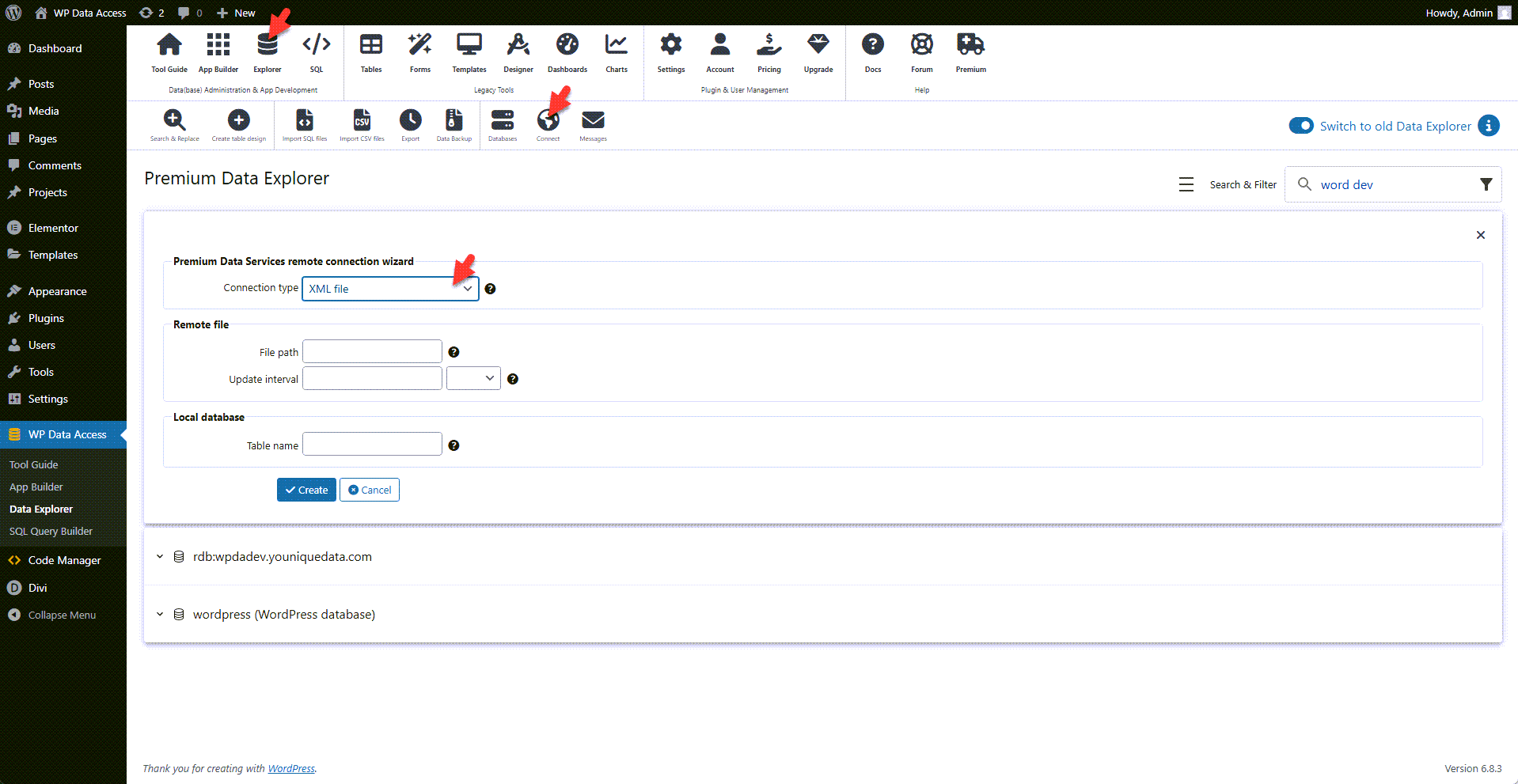
- Start the Data Explorer.
- Click the connect icon to open the remote connection wizard.
- Select XML file from the connection type drop-down list.
- Enter the public URL of your data file in the file path field.
- Define an update interval, or leave it blank if automatic updates are not required.
- Enter a table name.
- Click the create button.
USAGE
- Tables created from XML files can be used just like standard WordPress tables and are supported by all plugin tools.
- Read the limitations before you start.
XML Sample
xml
<?xml version="1.0" encoding="ISO-8859-1"?>
<dataset>
  <row>
    <empno>7369</empno>
    <ename>SMITH</ename>
    <job>CLERK</job>
    <mgr>7902</mgr>
    <hiredate>1981-09-18</hiredate>
    <sal>1600.97</sal>
    <comm>10</comm>
    <deptno>20</deptno>
  </row>
  <row>
    <empno>7499</empno>
    <ename>ALLEN</ename>
    <job>SALESMAN</job>
    <mgr>7698</mgr>
    <hiredate>1981-02-21</hiredate>
    <sal>1680.98</sal>
    <comm>30</comm>
    <deptno>30</deptno>
  </row>
  <row>
    <empno>7521</empno>
    <ename>WARD</ename>
    <job>SALESMAN</job>
    <mgr>7698</mgr>
    <hiredate>1981-01-23</hiredate>
    <sal>1250.00</sal>
    <comm>500</comm>
    <deptno>30</deptno>
  </row>
  <row>
    <empno>7566</empno>
    <ename>JONES</ename>
    <job>MANAGER</job>
    <mgr>7839</mgr>
    <hiredate>1981-04-01</hiredate>
    <sal>2975.00</sal>
    <comm></comm>
    <deptno>20</deptno>
  </row>
  <row>
    <empno>7654</empno>
    <ename>MARTIN</ename>
    <job>SALESMAN</job>
    <mgr>7698</mgr>
    <hiredate>1981-09-28</hiredate>
    <sal>1250.00</sal>
    <comm>1400</comm>
    <deptno>30</deptno>
  </row>
  <row>
    <empno>7698</empno>
    <ename>BLAKE</ename>
    <job>MANAGER</job>
    <mgr>7839</mgr>
    <hiredate>1981-05-01</hiredate>
    <sal>2850.00</sal>
    <comm></comm>
    <deptno>30</deptno>
  </row>
  <row>
    <empno>7782</empno>
    <ename>CLARK</ename>
    <job>MANAGER</job>
    <mgr>7839</mgr>
    <hiredate>1981-06-09</hiredate>
    <sal>2450.00</sal>
    <comm></comm>
    <deptno>10</deptno>
  </row>
  <row>
    <empno>7788</empno>
    <ename>SCOTT</ename>
    <job>ANALYST</job>
    <mgr>7566</mgr>
    <hiredate>1982-12-09</hiredate>
    <sal>3000.00</sal>
    <comm></comm>
    <deptno>20</deptno>
  </row>
  <row>
    <empno>7839</empno>
    <ename>KING</ename>
    <job>PRESIDENT</job>
    <mgr></mgr>
    <hiredate>1981-11-17</hiredate>
    <sal>5000.00</sal>
    <comm></comm>
    <deptno>10</deptno>
  </row>
  <row>
    <empno>7844</empno>
    <ename>TURNER</ename>
    <job>SALESMAN</job>
    <mgr>7698</mgr>
    <hiredate>1981-09-08</hiredate>
    <sal>1500.00</sal>
    <comm></comm>
    <deptno>30</deptno>
  </row>
  <row>
    <empno>7876</empno>
    <ename>ADAMS</ename>
    <job>CLERK</job>
    <mgr>7788</mgr>
    <hiredate>1983-01-12</hiredate>
    <sal>1100.00</sal>
    <comm></comm>
    <deptno>20</deptno>
  </row>
  <row>
    <empno>7900</empno>
    <ename>JAMES</ename>
    <job>CLERK</job>
    <mgr>7698</mgr>
    <hiredate>1981-12-03</hiredate>
    <sal>950.00</sal>
    <comm></comm>
    <deptno>30</deptno>
  </row>
  <row>
    <empno>7902</empno>
    <ename>FORD</ename>
    <job>ANALYST</job>
    <mgr>7566</mgr>
    <hiredate>1981-12-03</hiredate>
    <sal>3000.00</sal>
    <comm></comm>
    <deptno>20</deptno>
  </row>
  <row>
    <empno>7934</empno>
    <ename>MILLER</ename>
    <job>CLERK</job>
    <mgr>7782</mgr>
    <hiredate>1982-01-23</hiredate>
    <sal>1300.00</sal>
    <comm></comm>
    <deptno>10</deptno>
  </row>
</dataset>